

Our Product
Software Built to Run Your Business
Desktop software that keeps daily operations organized.
Our product
OptiCore – Complete Optical Shop Management Solution
OptiCore is a comprehensive optical shop management system designed to simplify and streamline daily business operations. It provides a centralized platform to manage all essential activities of an optical business. From handling customers, prescriptions, frames, and lenses to managing inventory, sales, and billing, OptiCore makes business management easier and more organized. It helps shop owners save time, improve efficiency, and maintain accurate business records.
Key Features:
- Customer Management
- Prescription Management
- Frames & Lenses Management
- Inventory & Stock Management
- Sales & Billing System
- Supplier Management
- Staff Management
- Business Reports & Analytics
- Order Management
- Expense Tracking
Business challenges we solve
One Desktop System for Your Entire Business
OptiCore is a desktop-based software system that digitalizes business operations. Billing, transactions, invoices and your A‑to‑Z business data are managed digitally, in one place.
Digital Billing Management
Digitalize the billing process and reduce manual paperwork.
Transaction Management
Maintain a clear record of every business transaction.
Invoice Management
Create, manage and track invoices digitally.
Centralized Data Management
Manage your A‑to‑Z business data in one centralized desktop system.
Operational Efficiency
Simplify manual processes to save time and effort.
Accurate Record Keeping
Keep business records organized and easily accessible.
How it works
From Eye Test to Eyewear Delivery
One simple flow for your optical shop, from the first customer visit to the final sale.
- 1
Customer & Eye Test
Register the customer and store their prescription and eye test details.
- 2
Frames & Lenses
Choose eyeglasses, sunglasses, frames and lenses from your live stock.
- 3
Billing & Order
Create the invoice, take payment and track the order until it is ready.
- 4
Delivery & Records
Hand over the order and keep sales, stock and customer records up to date.
Core features

Dashboard – Your Business at a Glance
The OptiCore Dashboard gives a centralized overview of your shop's daily operations and performance. Monitor sales, track outstanding receivables, identify low-stock products and review recent transactions, with quick access to new sales, eye tests, purchases, reports and day closing.
Key Features:
- Sales Overview: Monitor daily and monthly sales performance.
- Receivables Tracking: Keep track of outstanding customer payments.
- Low Stock Alerts: Identify products that need restocking.
- Sales Analytics: Review sales trends over the last 30 days.
- Payment Insights: See how payments are distributed.
- Recent Invoices: Quickly open recently generated invoices.
- Quick Actions: Reach frequent tasks from the dashboard.
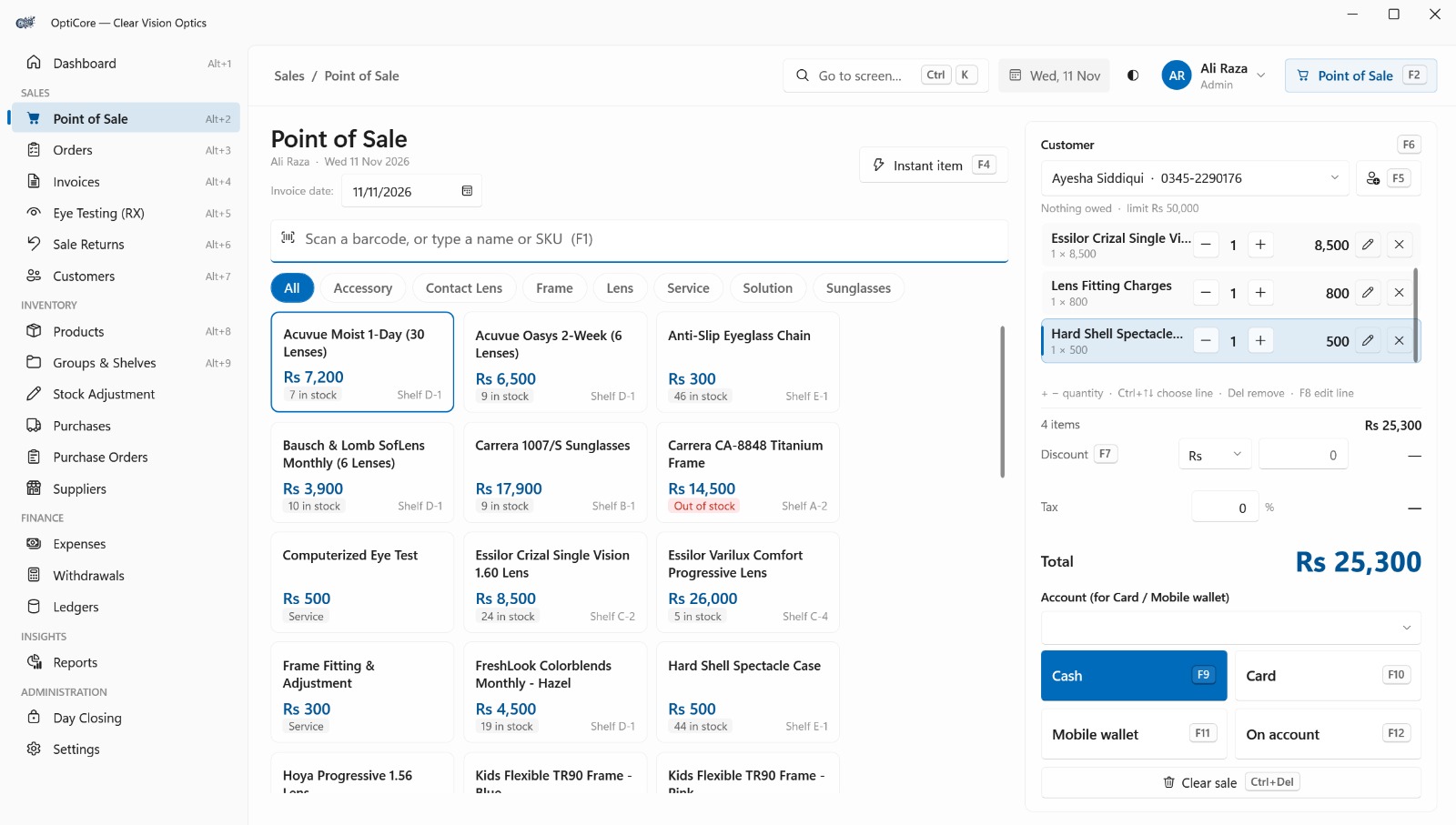
Point of Sale – Fast & Efficient Sales Processing
A quick, simple and organized billing interface. Search products by name or SKU, scan barcodes, manage customers and quantities, apply discounts and review the total before completing a sale, with keyboard shortcuts for a faster checkout.
Key Features:
- Barcode & SKU Search: Find products by scanning, name or SKU.
- Product Selection: Browse items and filter by category.
- Instant Item Entry: Add items directly to a sale.
- Customer Management: Select or add customers while billing.
- Sales Cart: Add, remove, edit and adjust quantities.
- Discount Management: Apply discounts to any sale.
- Multiple Payment Methods: Cash, card, mobile wallet and on account.
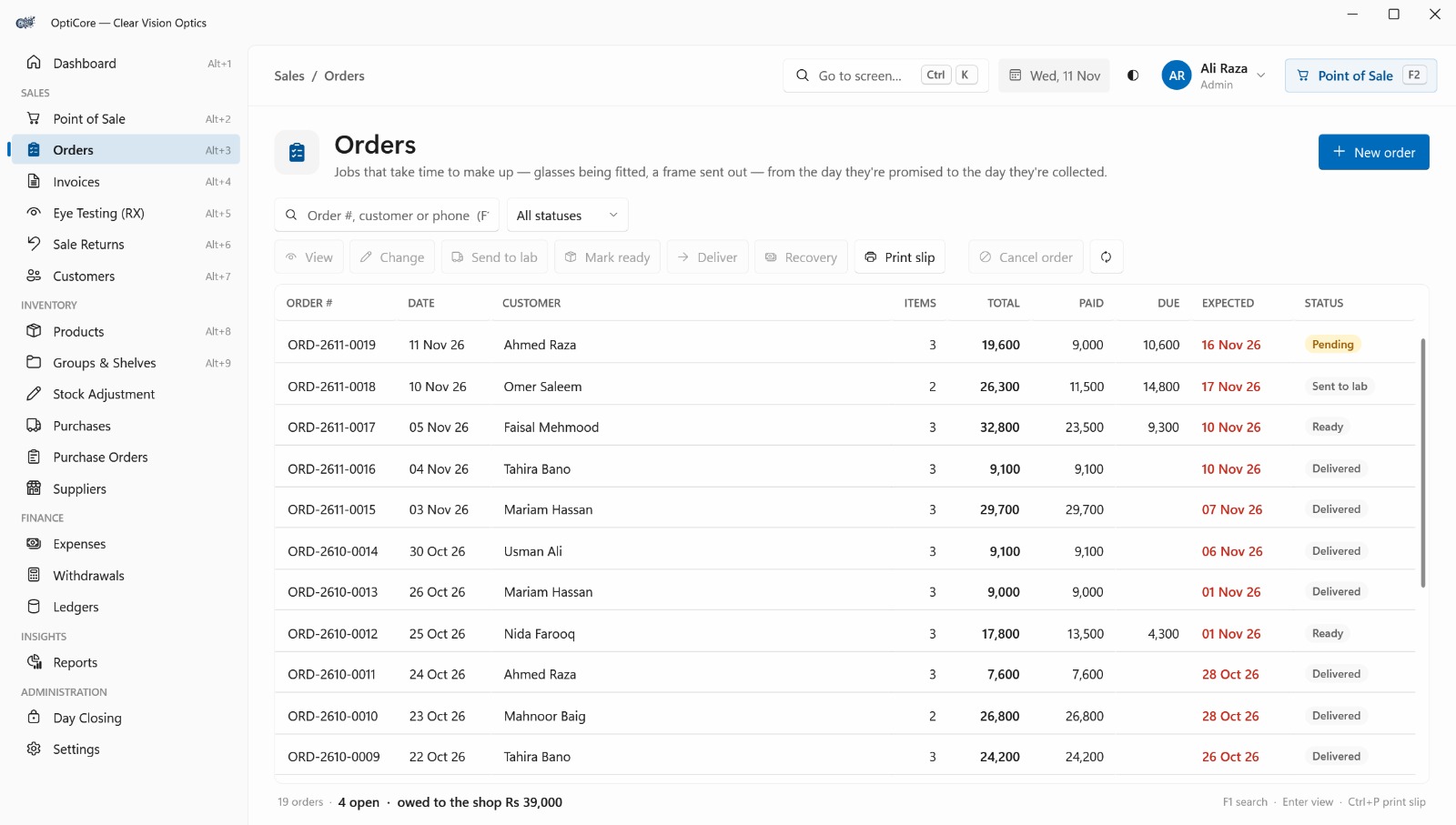
Orders – Track Jobs From Promise to Collection
Keep track of jobs that take time to make up, such as glasses being fitted or a frame sent out, from the day they're promised to the day they're collected. Search by order number, customer or phone, move each order through its stages and print a slip.
Key Features:
- Order Listing: All orders with total, paid, due and expected date.
- Status Tracking: Pending, sent to lab, ready and delivered.
- Search & Filter: Find orders by number, customer, phone or status.
- Send to Lab: Mark an order as sent out to the lab.
- Mark Ready & Deliver: Move an order to ready and then to delivered.
- Recovery: Receive the outstanding amount on an order.
- Print Slip: Print an order slip for the customer.
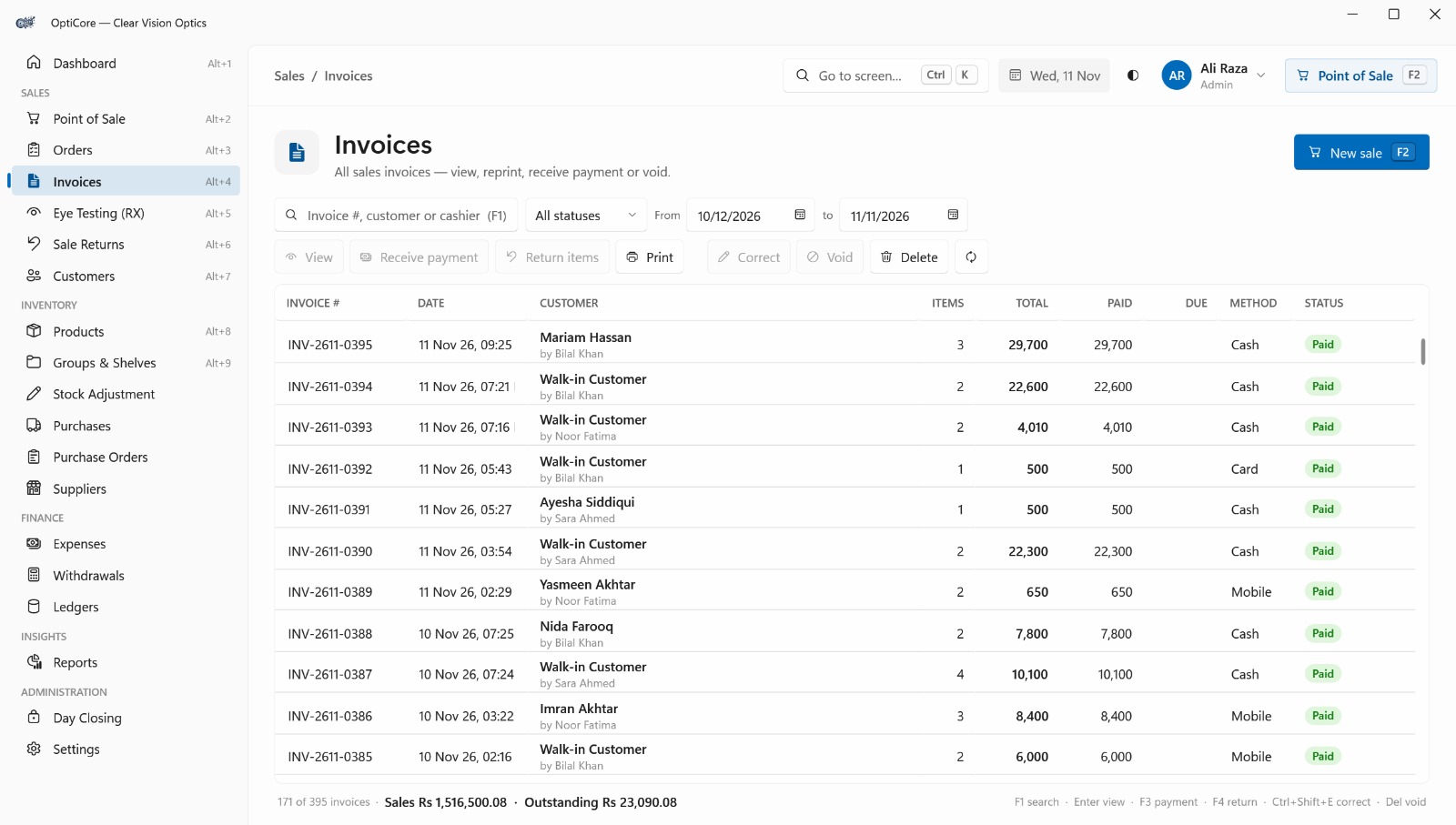
Invoices – Manage Sales Records & Payments
A centralized view of every sales invoice. Review invoice details and payment status, select an invoice to edit it, and receive outstanding payments, keeping your sales records accurate and customer balances in check.
Key Features:
- Invoice Listing: All invoices in one organized table.
- Status Tracking: Monitor the payment status of each invoice.
- Invoice Selection: Open details and available actions.
- Invoice Editing: Update existing records when required.
- Payment Collection: Receive payments against invoices.
- Outstanding Balances: Manage unpaid or partly paid invoices.
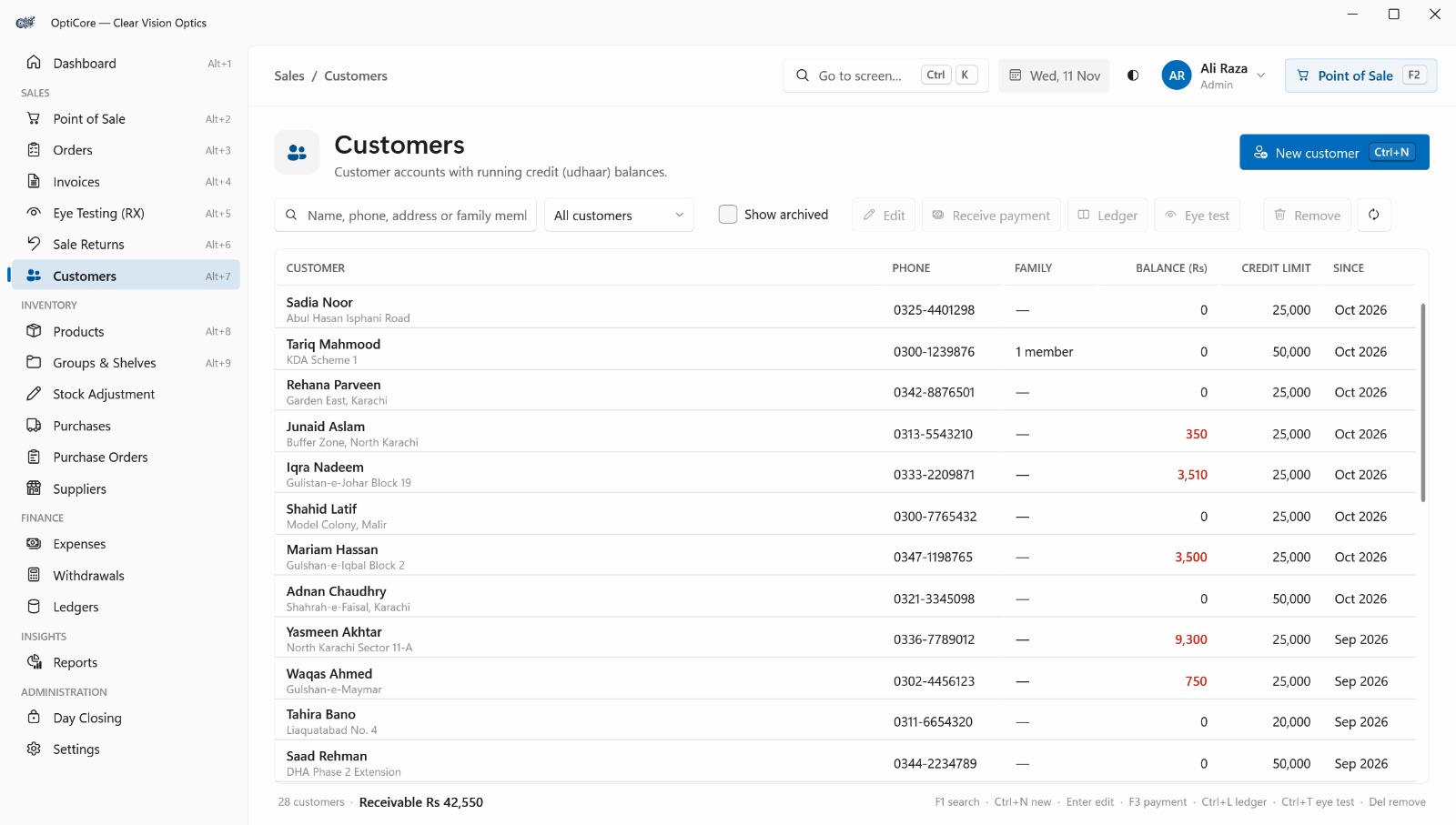
Customers – Manage Customer Accounts & Credit (Udhaar) Balances
Manage customer accounts and track running credit (udhaar) balances. See each customer's balance and credit limit, then edit details, receive payments, open the ledger or start an eye test, with a total receivable summary.
Key Features:
- Customer Records: All accounts in one organized table.
- Credit (Udhaar) Tracking: Balance against each credit limit.
- Payment Collection: Receive payments from the record.
- Customer Ledger: Open a full transaction history.
- Quick Eye Test Access: Start a test in one click.
- Family Member Linking: Keep family members on one account.
- Archive Support: Hide inactive customers.

Products – Manage Your Full Catalogue of Frames, Lenses & Services
Manage the complete catalogue of frames, lenses, contact lenses and services. Each product shows SKU, type, shelf, cost, price and stock status, and you can edit it, deactivate it or print barcode labels.
Key Features:
- Product Catalogue: All products in one organized table.
- Multiple Product Types: Frames, lenses, contact lenses, services.
- Cost & Price Tracking: Cost and selling price for every item.
- Stock Status: In Stock or Out of Stock at a glance.
- Group & Shelf Organization: Assign products to groups and shelves.
- Label Printing: Print barcode labels.
- Smart Search & Filters: Filter by product type or stock.
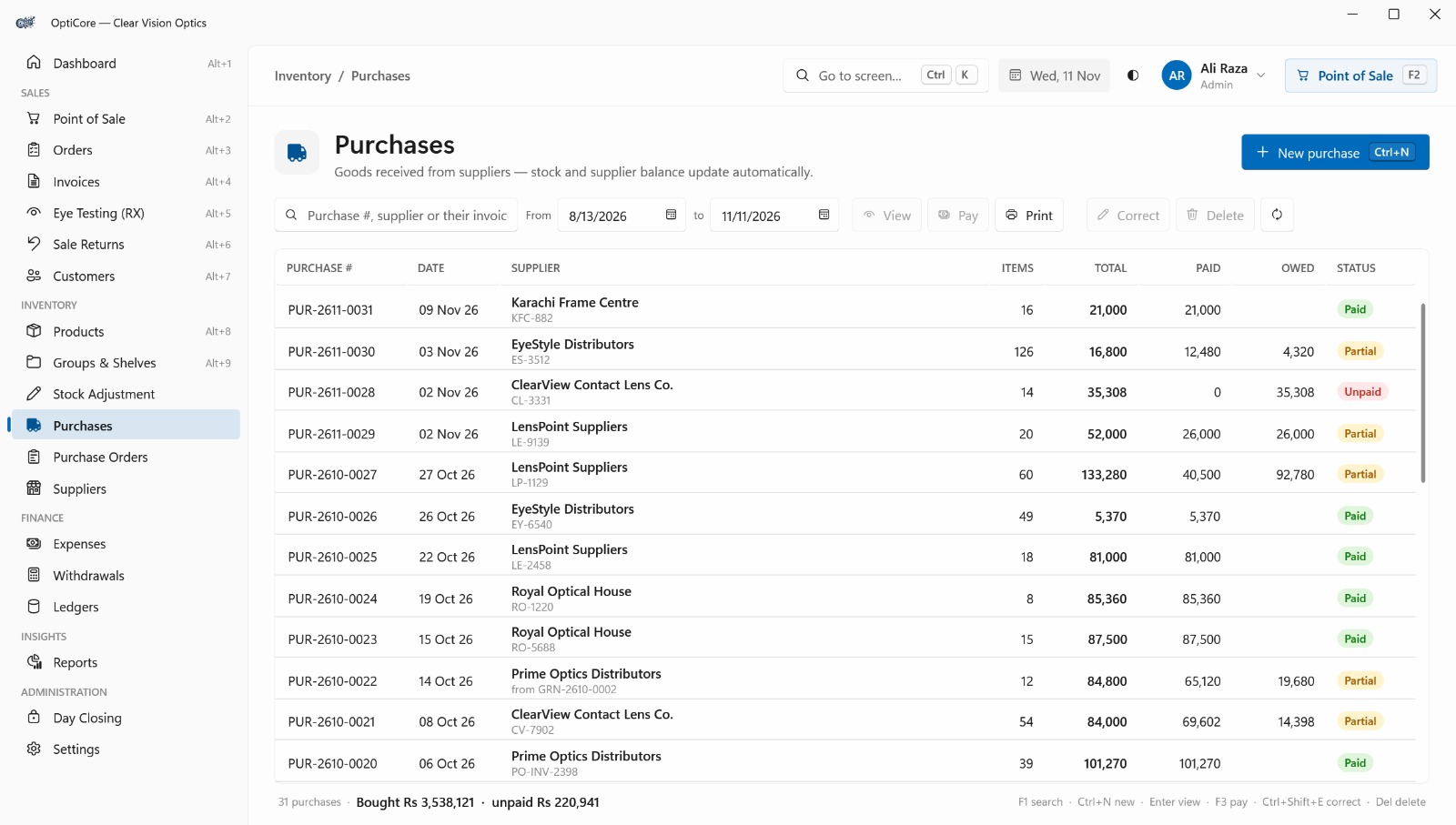
Purchases – Record Supplier Goods & Track Payments Automatically
Record goods received from suppliers. Stock and supplier balances update automatically with every purchase, and each record shows total, paid and owed amounts along with its payment status.
Key Features:
- Purchase Records: All supplier purchases in one table.
- Automatic Stock Update: Received goods join inventory instantly.
- Supplier Balance Update: Payables update with every purchase.
- Payment Tracking: Total, paid and owed per purchase.
- Supplier Payments: Pay directly from the purchase record.
- Purchase Correction: Fix mistakes without a new record.
- Purchase Summary: Total bought and unpaid amounts.

Purchase Orders – Order from Suppliers, Receive Goods with GRN & Raise Bills
Place orders with suppliers and manage the whole buying cycle: order from the supplier, receive goods with a GRN (Goods Received Note) and raise the bill from that GRN. Follow each order from Draft to Sent and Received.
Key Features:
- Order Records: All purchase orders in one table.
- Status Tracking: Draft, Sent and Received.
- Expected Delivery Dates: Know when each delivery is due.
- Receive Goods with GRN: Record goods against the order.
- Bill from GRN: Raise the supplier bill from received goods.
- Order Control: Correct, cancel or delete orders.
- Print Orders: Share purchase orders with suppliers.
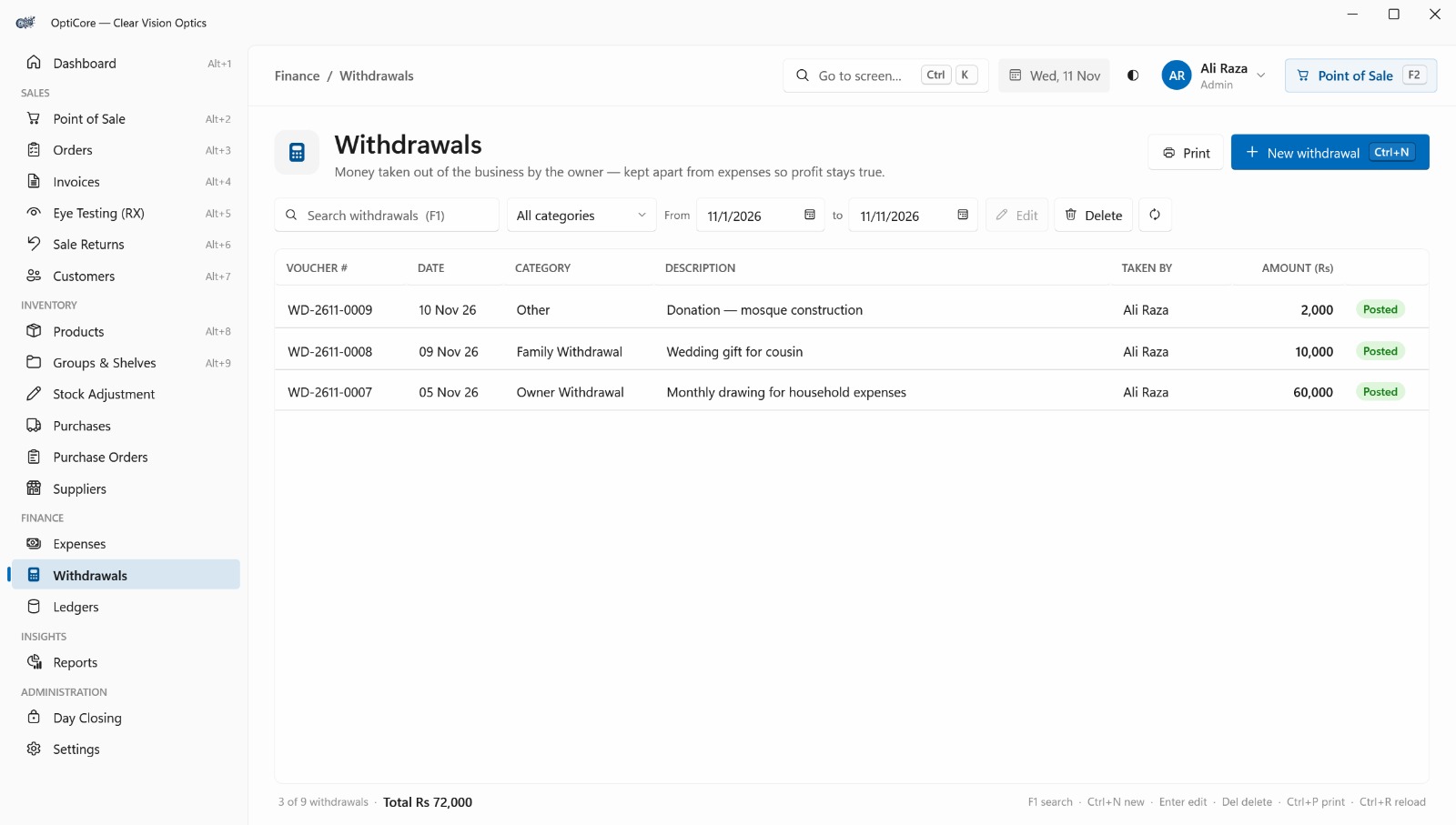
Withdrawals – Track Owner Withdrawals Separately to Keep Profit Accurate
Record money taken out of the business by the owner, kept separate from shop expenses so profit and loss figures stay true. Each entry shows the voucher number, category, who took the money and the amount.
Key Features:
- Withdrawal Records: All owner withdrawals in one table.
- Voucher Numbering: A unique reference for every entry.
- Separate from Expenses: Keeps profit accurate.
- Category & Description: Note the purpose of each withdrawal.
- Taken By Tracking: See who took the money.
- Edit & Print: Correct, remove or print records.
- Smart Search & Filters: By category and date range.
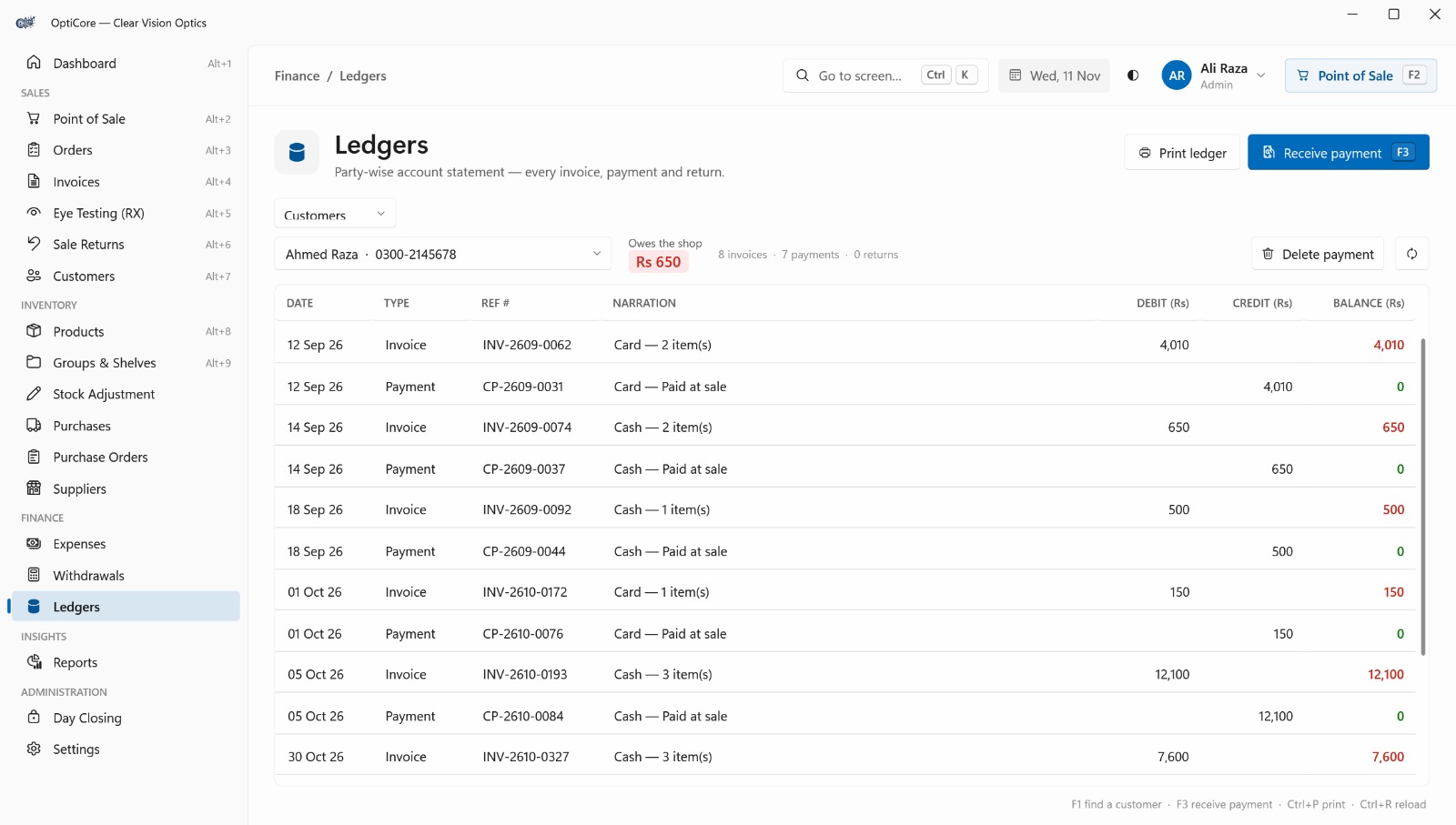
Ledgers – Party-Wise Account Statements with Every Invoice, Payment & Return
A complete party-wise account statement for a selected customer, showing every invoice, payment and return with debit, credit and running balance. Receive a payment or print the statement from the same screen.
Key Features:
- Party-Wise Statements: View any customer's full account history.
- Transaction Trail: Invoices, payments and returns with references.
- Running Balance: Follow the balance after each entry.
- Outstanding Balance: See what the customer owes the shop.
- Activity Summary: Counts of invoices, payments and returns.
- Payment Collection: Receive payments from the ledger.
- Print Ledger: Print the statement for the customer.
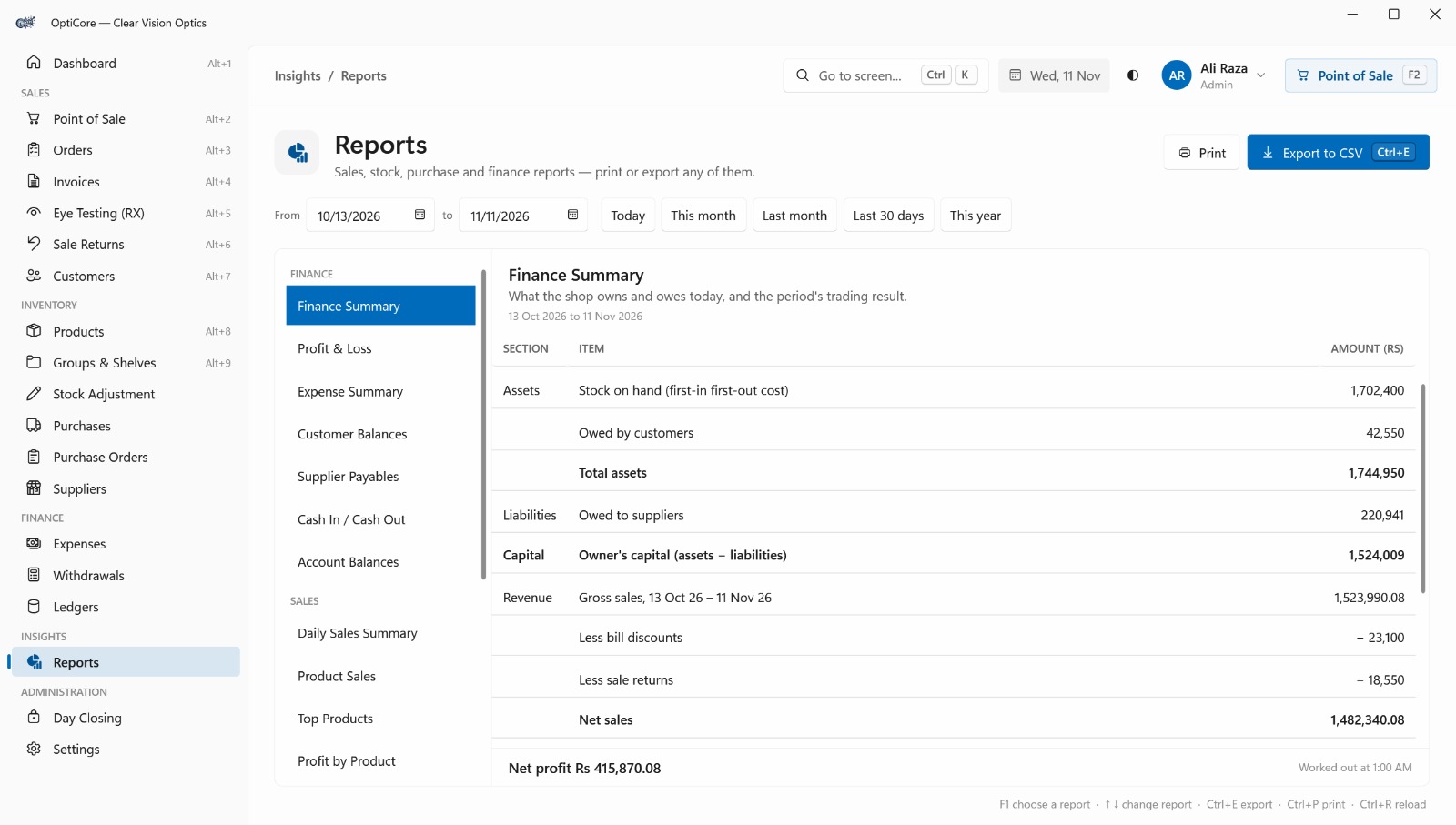
Reports – Sales, Stock, Purchase & Finance Reports, Ready to Print or Export
Sales, stock, purchase and finance reports in one place, grouped by category, each ready to print or export to CSV. Choose a custom date range or quick filters like Today, This month and This year.
Key Features:
- Centralized Reporting: All report types from one screen.
- Finance Reports: Finance Summary, Profit & Loss, Expenses.
- Receivables & Payables: Customer Balances and Supplier Payables.
- Daily Sales Summary: Sales, discounts and payment split.
- Product Insights: Product Sales, Top Products, Profit by Product.
- Flexible Date Filters: Custom range or quick filters.
- Print & Export to CSV: Use any report in Excel or elsewhere.
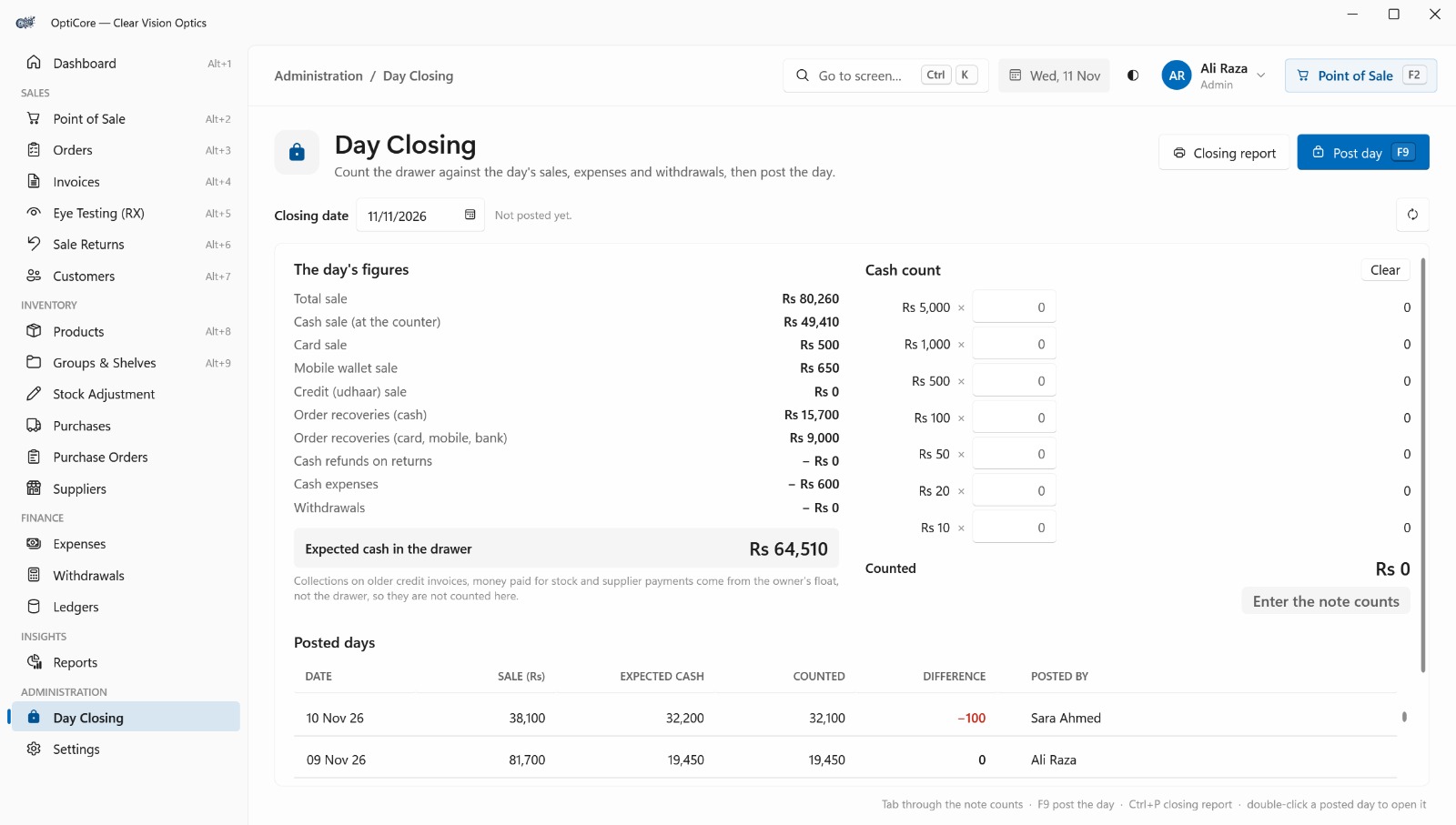
Day Closing – Count the Drawer, Match the Day's Figures & Post the Day
Close each business day accurately. OptiCore shows the day's sales, refunds, expenses and withdrawals and calculates the expected cash. Staff count the drawer note by note, compare it, then post the day.
Key Features:
- Daily Figures Summary: Cash, card, wallet and credit sales.
- Automatic Expected Cash: Adjusted for refunds, expenses and withdrawals.
- Note-Wise Cash Count: Get the counted total instantly.
- Difference Detection: Spot any shortage or excess.
- Post Day: Lock in the closing with F9.
- Closing Report: Print a complete report for records.
- Posted Days History: Review past closings.
Why choose us
Why Optical Shops Choose OptiCore
A dependable system designed around the way optical businesses actually work, from the first eye test to the final day closing.
Built for Optical Shops
Eye testing, prescriptions, frames, lenses and stock are part of the system from day one, not an afterthought.
All-in-One Management
Sales, billing, inventory, purchasing, suppliers, expenses and reports live together in one desktop application.
Fast, Keyboard-Friendly Workflow
Barcode scanning and keyboard shortcuts keep the counter moving, so billing stays quick even on busy days.
Accurate, Traceable Records
Stock changes, returns, payments and day closing are all recorded, so your numbers can always be trusted.
Role-Based Access
Admin, Manager and Cashier roles control which screens and actions each team member can use.
Backed by GFT Solutions
OptiCore is built and maintained by the same remote team behind our client projects, with a long-term view.
Ready to run your optical shop smarter?
Talk to our team and see how OptiCore fits your business.
FAQ
Frequently asked questions
Common questions about OptiCore, our optical shop management system. Can't find your answer? Reach out and we will get back to you.
OptiCore is a desktop-based optical shop management system. It brings customers, prescriptions, frames and lenses, inventory, sales and billing, suppliers, expenses and reports together in one place.